자바 GUI 프로젝트가 종료되었다. 학기 동안 꾸준히 제작해서 완성도와 학습 두 마리 토끼를
다 잡으려 했는데 시험이랑 프로젝트가 많아서 벼락치기 식으로 한 것 같다...
- 제안서 초안
이번 프로젝트의 주제는 사용자 경험 기반의 카페 POS 제작이였다.
실제로 내가 알바를 하고 있고, 경험을 토대로 봤을 때 POS의
디자인이나 로직 및 형태가 자바GUI로 개발할 수 있다고 생각했다.
-브레인스토밍 => 일하면서 제일 답답하고 짜증났던 것은
메뉴가 존재하는 것은 아는데 키 맵을 도무지 찾을 수 없었던 점이다.
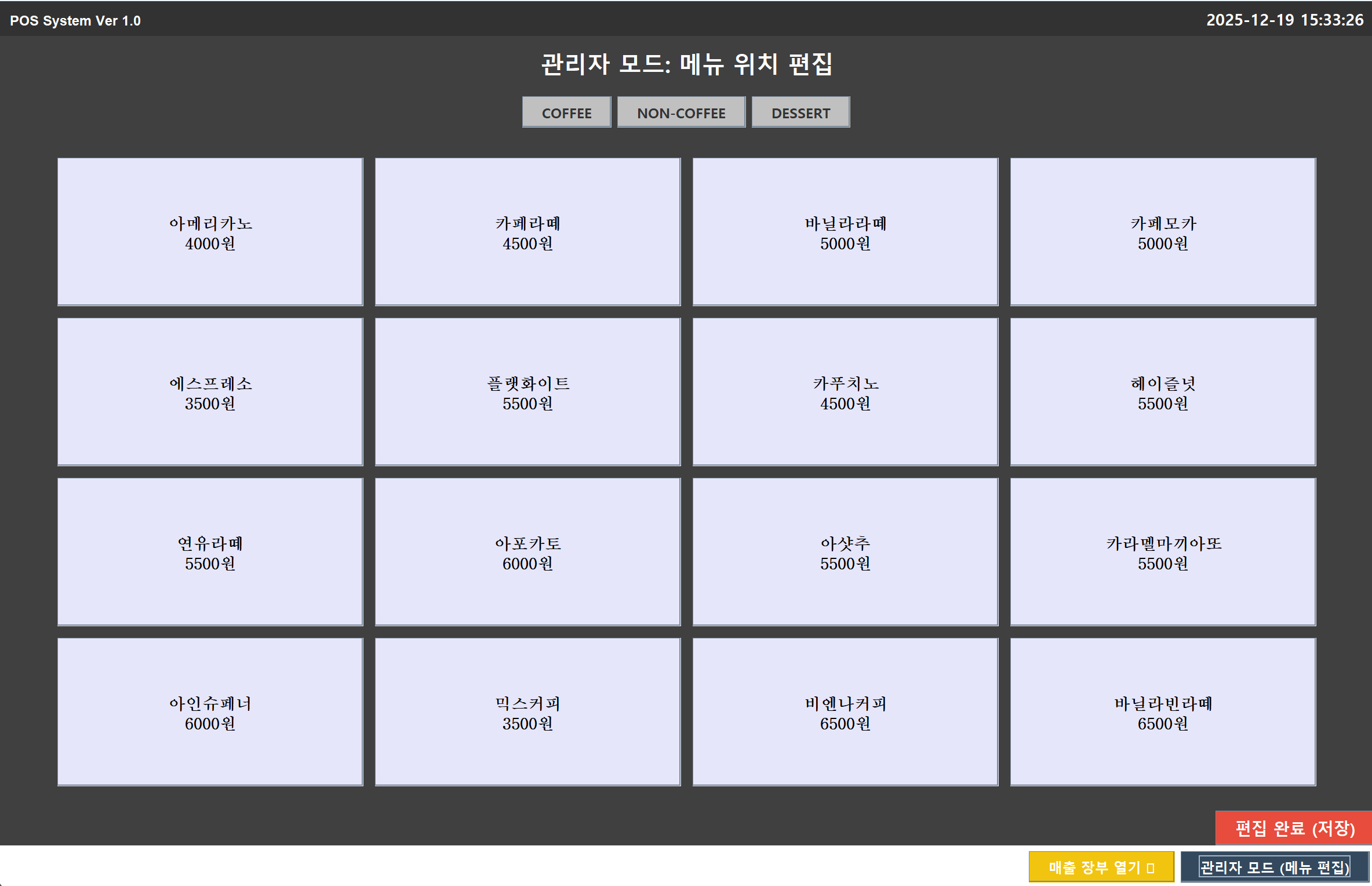
-해결 방안 => 내가 원하는 위치에 키 맵을 옮길 수 있도록 하는 편집 모드를 개발한다.
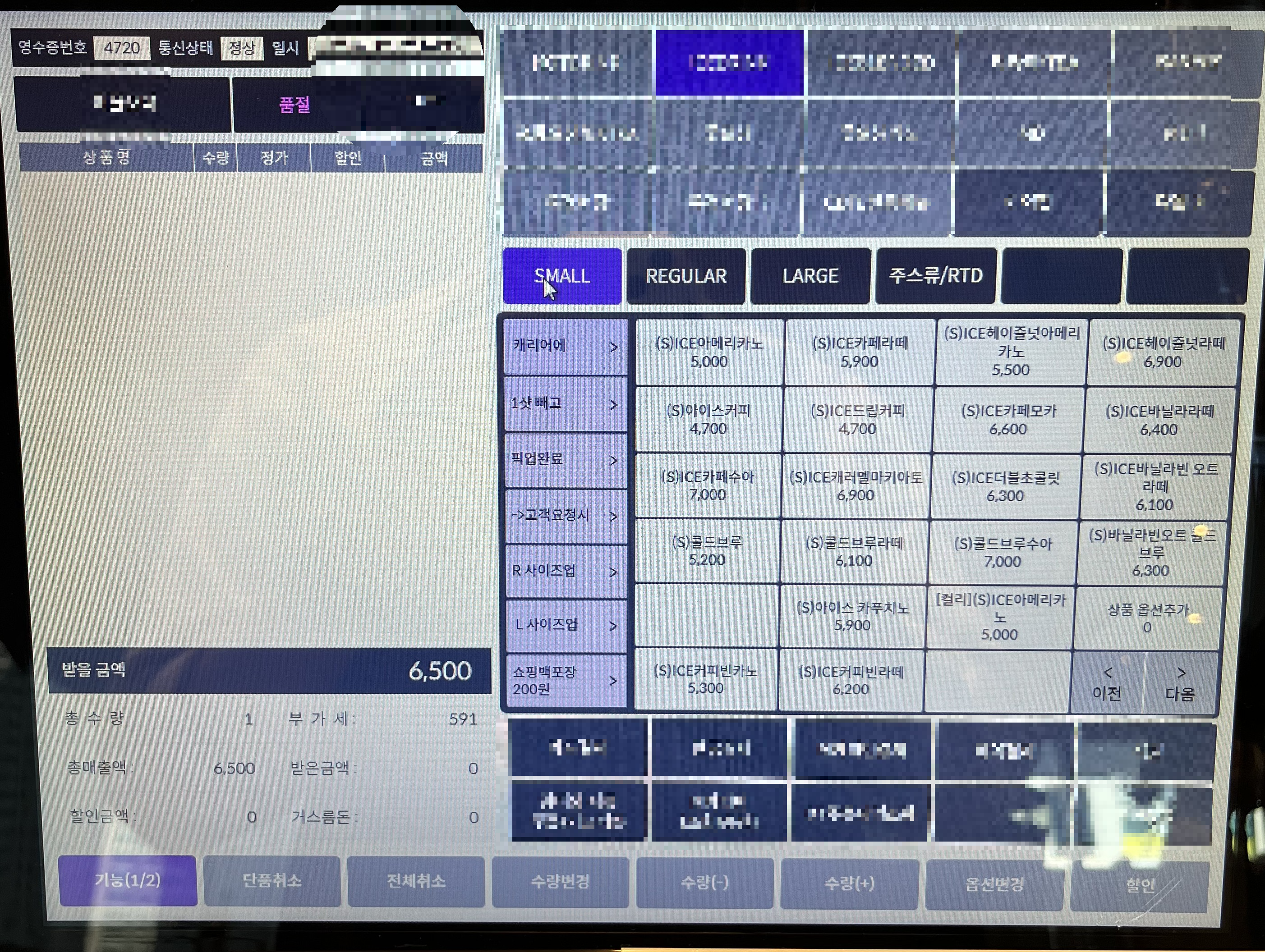
- 도안
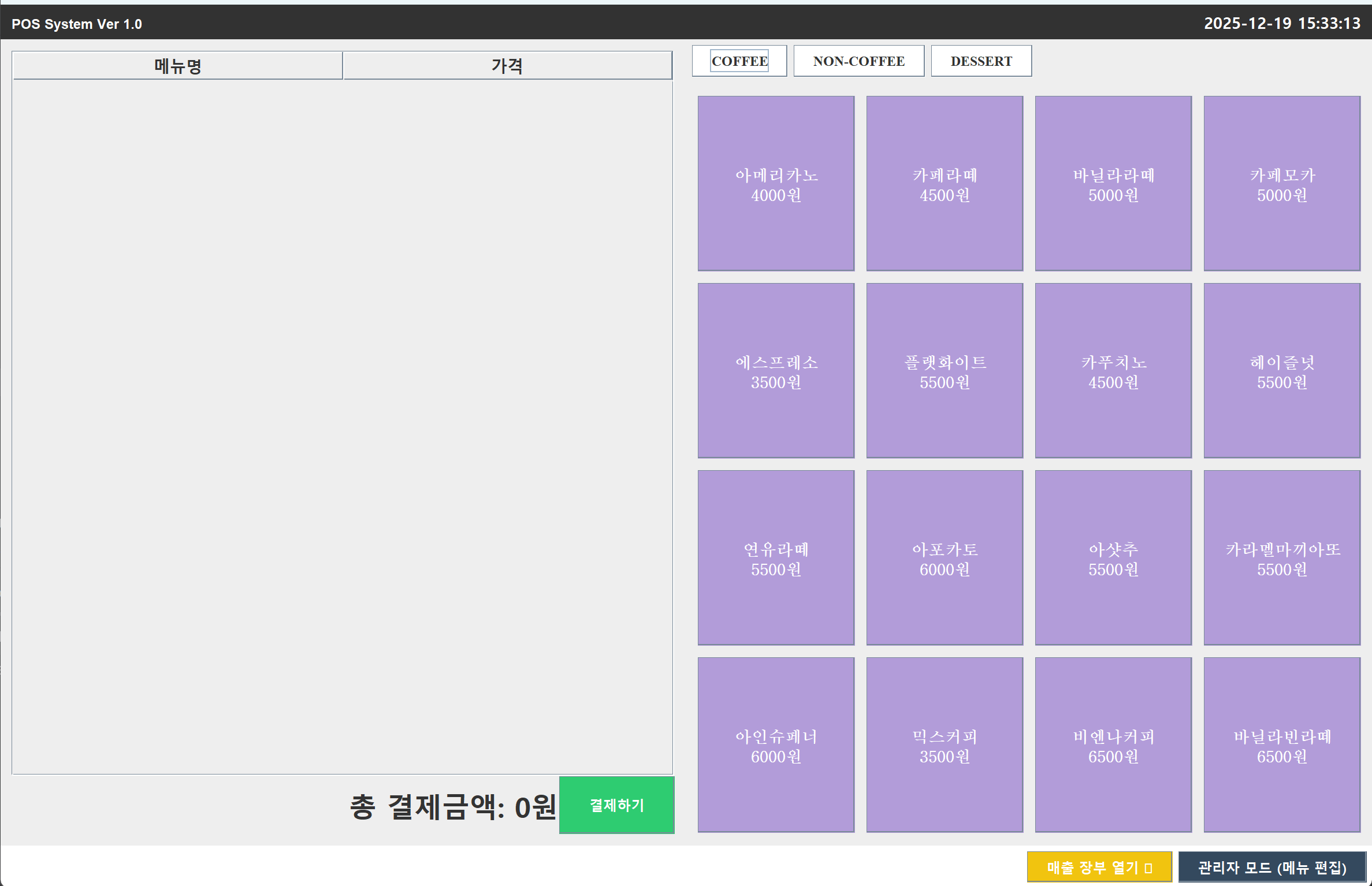
- pos의 역할을 할 수 있는 화면
- 품목들을 계산할 수 있는 장바구니
- 편집모드
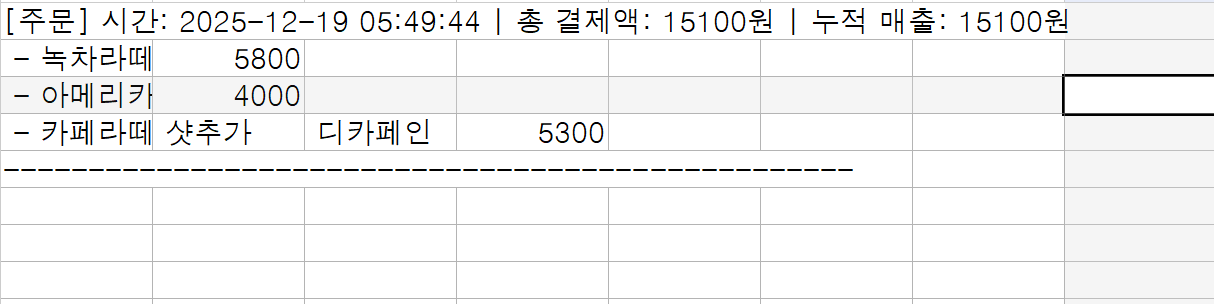
- 기록과 누적 매출을 확인할 수 있는 csv파일
- 실행 방법
- 패널을 카드 레이아웃을 이용하여 편집 화면 구성
- 자바 API의 I/O 클래스 사용하여 파일 저장과 열기 처리
- MVC모델을 활용하여 로직과 화면 분리
<패키지 구조>

- Model
- Menu 데이터 관리자 클래스를 만들어서 실제 음료 데이터를 관리하게 한다.
- Sales 매니저 클래스를 만들어서 매출이 실제 파일에 기록되게 한다.
package cafe.pos.model;

import java.util.*;

public class MenuDataManager {
    private List<MenuItem> menuList;

    public MenuDataManager() {
        menuList = new ArrayList<>();
        initData();
    }

    private void initData() {
        // 초기 데이터 세팅 (나중에는 파일에서 불러오도록 수정)
        menuList.add(new MenuItem("아메리카노", 4000, "COFFEE"));
        menuList.add(new MenuItem("카페라떼", 4500, "COFFEE"));
        menuList.add(new MenuItem("바닐라라떼", 5000, "COFFEE"));
        menuList.add(new MenuItem("카페모카", 5000, "COFFEE"));
        menuList.add(new MenuItem("에스프레소", 3500, "COFFEE"));
        menuList.add(new MenuItem("플랫화이트", 5500, "COFFEE"));
        menuList.add(new MenuItem("카푸치노", 4500, "COFFEE"));
        menuList.add(new MenuItem("헤이즐넛", 5500, "COFFEE"));
        menuList.add(new MenuItem("연유라떼", 5500, "COFFEE"));
        menuList.add(new MenuItem("아포카토", 6000, "COFFEE"));
        menuList.add(new MenuItem("아샷추", 5500, "COFFEE"));
        menuList.add(new MenuItem("카라멜마끼아또", 5500, "COFFEE"));
        menuList.add(new MenuItem("아인슈페너", 6000, "COFFEE"));
        menuList.add(new MenuItem("믹스커피", 3500, "COFFEE"));
        menuList.add(new MenuItem("비엔나커피", 6500, "COFFEE"));
        menuList.add(new MenuItem("바닐라빈라떼", 6500, "COFFEE"));

        menuList.add(new MenuItem("초코라떼", 5500, "NON-COFFEE"));
        menuList.add(new MenuItem("녹차라떼", 5800, "NON-COFFEE"));
        menuList.add(new MenuItem("아이스티", 4500, "NON-COFFEE"));
        menuList.add(new MenuItem("레몬에이드", 5500, "NON-COFFEE"));
        menuList.add(new MenuItem("자몽에이드", 6000, "NON-COFFEE"));
        menuList.add(new MenuItem("딸기맛 차", 6500, "NON-COFFEE"));
        menuList.add(new MenuItem("밀크티", 6500, "NON-COFFEE"));
        menuList.add(new MenuItem("요거트", 6500, "NON-COFFEE"));
        menuList.add(new MenuItem("망고 주스", 6500, "NON-COFFEE"));
        menuList.add(new MenuItem("캐모마일", 6500, "NON-COFFEE"));
        menuList.add(new MenuItem("자스민", 6500, "NON-COFFEE"));
        menuList.add(new MenuItem("페퍼민트", 6500, "NON-COFFEE"));

        menuList.add(new MenuItem("초코케이크", 6500, "DESSERT"));
        menuList.add(new MenuItem("생크림케이크", 6500, "DESSERT"));
        menuList.add(new MenuItem("딸기초코케이크", 6500, "DESSERT"));
        menuList.add(new MenuItem("자몽케이크", 6500, "DESSERT"));
    }

    public List<MenuItem> getMenuList() {
        return menuList;
    }

    // 리스트 내의 두 요소 위치를 바꾸는 메서드
    public void swapItems(int index1, int index2) {
        if (index1 >= 0 && index1 < menuList.size() &&
                index2 >= 0 && index2 < menuList.size()) {
            Collections.swap(menuList, index1, index2); // 자바 유틸 기능 활용
        }
    }
}
package cafe.pos.model;
import java.io.*;
import java.time.LocalDateTime;
import java.time.format.DateTimeFormatter;
import java.util.List;
public class SalesManager {
private static final String FILE_NAME = "sales_log.csv"; // 저장될 파일명
private int totalSales = 0;
public SalesManager() {
loadBeforeTotal();
}
private void loadBeforeTotal() {
File file = new File(FILE_NAME);
if (!file.exists()) return;
try (BufferedReader br = new BufferedReader(new FileReader(file))) {
String line;
String lastLine = "";
// 파일의 끝까지 읽기
while ((line = br.readLine()) != null) {
// "누적 매출:" 이라는 단어가 있는 줄만 기억함
if (line.contains("누적 매출:")) {
lastLine = line;
}
}
// 마지막 기록이 있다면 숫자만 뽑아냄
if (!lastLine.isEmpty()) {
String[] parts = lastLine.split("누적 매출:");
if (parts.length > 1) {
String numStr = parts[1].replace("원", "").trim();
totalSales = Integer.parseInt(numStr); //Integer클래스 활용
}
}
} catch (Exception e) {
System.out.println("기존 매출 불러오기 실패: 0원부터 시작합니다.");
totalSales = 0;
}
}
// 주문 리스트를 받아서 파일에 저장하는 기능
public void saveOrder(List<OrderItem> orderList, int totalAmount) {
totalSales += totalAmount;
// try문 사용
try (BufferedWriter writer = new BufferedWriter(new FileWriter(FILE_NAME, true))) {
// 현재 시간 구하기
String time = LocalDateTime.now().format(DateTimeFormatter.ofPattern("yyyy-MM-dd HH:mm:ss"));
// 파일에 기록할 내용
writer.write("[주문] 시간: "+time+" | 총 결제액: "+totalAmount+"원 | 누적 매출: " + totalSales + "원");
writer.newLine();
// 세부 메뉴 기록
for (OrderItem item : orderList) {
writer.write(" - " + item.toCSV());
writer.newLine();
}
writer.write("--------------------------------------------------");
writer.newLine();
System.out.println("매출 저장 완료: " + FILE_NAME + "현재 누적액: " + totalSales);
//콘솔에 나오게 구현
} catch (IOException e) {
e.printStackTrace();
// 에러
}
}
}
csv 파일을 이용하여 엑셀 파일이 열리도록 한다.
- View
- 편집 패널, 주문 패널, 다이얼로그 등을 관리하는 클래스를 만든다.
- 편집 패널을 만들어서
- main 프레임에서 출력하도록 설정한다.
package cafe.pos.view;

import cafe.pos.view.MenuButton;
import cafe.pos.model.MenuDataManager;
import cafe.pos.model.MenuItem;
import javax.swing.*;
import java.awt.*;
import java.awt.event.*;
import java.util.List;

public class EditPanel extends JPanel {
    private JPanel menuGridPanel;
    private MenuButton firstSelectedButton = null;
    private MenuDataManager dataManager;

    // [추가] 현재 편집 중인 카테고리 (기본값: COFFEE)
    private String currentCategory = "COFFEE";

    public EditPanel(Runnable onComplete, MenuDataManager dataManager) {
        this.dataManager = dataManager;

        setLayout(new BorderLayout());
        setBackground(Color.DARK_GRAY);

        // 상단 패널
        JPanel topPanel = new JPanel(new BorderLayout());
        topPanel.setBackground(Color.DARK_GRAY);

        // 제목
        JLabel titleLabel = new JLabel("관리자 모드: 메뉴 위치 편집", SwingConstants.CENTER);
        titleLabel.setFont(new Font("맑은 고딕", Font.BOLD, 20));
        titleLabel.setForeground(Color.WHITE);
        titleLabel.setBorder(BorderFactory.createEmptyBorder(10, 0, 10, 0));
        topPanel.add(titleLabel, BorderLayout.NORTH);

        // 카테고리 선택 버튼
        JPanel categoryPanel = new JPanel(new FlowLayout(FlowLayout.CENTER));
        categoryPanel.setBackground(Color.DARK_GRAY);

        String[] categories = {"COFFEE", "NON-COFFEE", "DESSERT"};
        for (String cat : categories) {
            JButton catBtn = new JButton(cat);
            catBtn.setFont(new Font("맑은 고딕", Font.BOLD, 12));
            catBtn.setBackground(Color.LIGHT_GRAY); // 관리자 모드니까 약간 톤 다운

            catBtn.addActionListener(e -> {
                currentCategory = cat; // 카테고리 변경
                // 카테고리 바꿨으면 선택 상태 초기화
                firstSelectedButton = null;
                refreshEditButtons(); // 화면 다시 그리기
            });
            categoryPanel.add(catBtn);
        }
        topPanel.add(categoryPanel, BorderLayout.SOUTH);

        add(topPanel, BorderLayout.NORTH);


        // 중앙 메뉴 그리드
        menuGridPanel = new JPanel(new GridLayout(0, 4, 10, 10));
        menuGridPanel.setBorder(BorderFactory.createEmptyBorder(20, 50, 20, 50));
        menuGridPanel.setBackground(Color.DARK_GRAY);
        add(menuGridPanel, BorderLayout.CENTER);

        refreshEditButtons(); // 초기 화면 띄우기

        // 하단 완료 버튼
        JPanel bottomPanel = new JPanel(new BorderLayout());
        bottomPanel.setBackground(Color.DARK_GRAY);

        JButton finishBtn = new JButton("편집 완료 (저장)");
        finishBtn.setFont(new Font("맑은 고딕", Font.BOLD, 14));
        finishBtn.setBackground(new Color(231, 76, 60)); // 붉은색 계열 (종료 느낌)
        finishBtn.setForeground(Color.WHITE);

        finishBtn.addActionListener(e -> {
            JOptionPane.showMessageDialog(this, "메뉴 배치가 저장되었습니다.");
            onComplete.run();
        });

        bottomPanel.add(finishBtn, BorderLayout.EAST);
        add(bottomPanel, BorderLayout.SOUTH);
    }

    public void refreshEditButtons() {
        menuGridPanel.removeAll();
        List<MenuItem> items = dataManager.getMenuList();

        for (int i = 0; i < items.size(); i++) {
            MenuItem item = items.get(i);

            if (item.getCategory().equals(currentCategory)) {

                MenuButton btn = new MenuButton(item.getName(), item.getPrice(), i);

                btn.setForeground(Color.BLACK);
                btn.setBackground(new Color(230, 230, 250));

                btn.addActionListener(e -> handleSwapProcess(btn));
                menuGridPanel.add(btn);
            }
        }
        menuGridPanel.revalidate();
        menuGridPanel.repaint();
    }

    private void handleSwapProcess(MenuButton clickedBtn) {

        if (firstSelectedButton == null) {
            firstSelectedButton = clickedBtn;
            firstSelectedButton.setBackground(new Color(157,134,199)); // 선택됨 표시 (눈에 띄게)
            firstSelectedButton.setText("<html><center>" + clickedBtn.getText() + "<br>(선택됨)</center></html>");
        }
        else {
            if (firstSelectedButton == clickedBtn) {
                refreshEditButtons(); // 같은 거 누르면 취소 (원래대로)
                firstSelectedButton = null;
                return;
            }

            // 데이터 매니저가 전체 리스트 기준으로 인덱스 교체
            dataManager.swapItems(firstSelectedButton.getIndex(), clickedBtn.getIndex());

            // 화면 갱신 및 선택 초기화
            firstSelectedButton = null;
            refreshEditButtons();
        }
    }
}- Controller
- 장바구니에서 계산되거나 삭제되는 동작을 수행한다.
- Menu 데이터 관리자에 있는 실제 음료 데이터도 이곳에서 관리한다.
- 테스트
- JUnit 4 라이브러리를 이용하여 단위 테스트를 진행했다.
- 가짜 View를 하나 만들어서 테스트하는 방식으로 진행했다.
package cafe.pos.test;

import cafe.pos.controller.OrderController;
import cafe.pos.model.*;
import cafe.pos.view.OrderPanel;
import org.junit.Before;
import org.junit.Test;

import java.io.File;
import java.util.ArrayList;
import java.util.List;

import static org.junit.Assert.*;

public class PosSystemTest {

    private OrderController controller;
    private MenuDataManager dataManager;
    private SalesManager salesManager;

    // 테스트용 View
    private OrderPanel View;

    @Before
    public void setUp() {
        dataManager = new MenuDataManager();  //메뉴 데이터
        controller = new OrderController(dataManager); //데이터 관리 로직
        salesManager = new SalesManager(); //파일 입력

        // View 없이 로직만 테스트하기 위해 가짜 View 연결
        View = new OrderPanel(dataManager) {
            @Override public void updateTable(String name, int price, int total) {}
            @Override public void clearTable() {}
            @Override public void removeRowFromTable(int index, int total) {}
        };
        controller.setView(View); //View 보여주기
    }


    // 1. 아메리카노 + 샷추가 -> 가격 2500원 검증
    @Test
    public void test1_OptionPriceCalculation() {
        System.out.println("-- Test Case 1: 옵션 가격 적용 --"); //로그 출력

        // given
        String menuName = "아메리카노 (샷추가)";
        int Price = 2000; //아메리카노 가격
        int optionPrice = 500; //샷 추가 가격
        int finalPrice = Price + optionPrice;

        // when (장바구니 담기)
        controller.addItemToCart(menuName, finalPrice);

        // then (검증)
        assertEquals("총 결제 금액 = 2,500원", 2500, controller.getCurrentTotal()); //가격 받아오기
        assertEquals("장바구니에 1개.", 1, controller.getOrderListSize()); //장바구니 리스트 불러오기
        System.out.println("성공: 2500원 계산 완료");
    }

    // 2. 장바구니 빈 상태로 결제 시도 -> 다이얼로그 확인
    @Test
    public void testCase2_EmptyCartPayment() {
        System.out.println("-- Test Case 2: 빈 장바구니 결제 방지 --");

        // 장바구니 리스트 사이즈 0
        assertEquals(0, controller.getOrderListSize());

        // 중단되는지 검증
        controller.processPayment();

        // 아무 변화가 없어야 함 = 결제 실패
        assertEquals("결제가 진행되지 않아 총액은 0원", 0, controller.getCurrentTotal());
        System.out.println("성공: 결제 실패 확인");
    }

    // 3. 메뉴 삭제 시 차감 확인
    @Test
    public void testCase3_DeleteItem() {
        System.out.println("-- Test Case 3: 삭제 시 금액 차감 --");

        // 5,000원 담기
        controller.addItemToCart("아메리카노", 2000);
        controller.addItemToCart("라떼", 3000);
        assertEquals(5000, controller.getCurrentTotal());

        // 장바구니 리스트에서 0번째 삭제
        controller.removeItem(0);

        // 한 개 남은 리스트 비교
        assertEquals("총액 3000원", 3000, controller.getCurrentTotal());
        assertEquals("장바구니 개수 1개", 1, controller.getOrderListSize());
        System.out.println("성공: 삭제 후 3000원 갱신");
    }

    // 4. 매출 기록이 파일에 정상적으로 누적되는지 확인
    @Test
    public void testCase4_FileRecording() {
        System.out.println("-- Test Case 4: 매출 누적 저장 확인 --");

        // sales_log.csv 파일에 저장
        String fileName = "sales_log.csv";
        File file = new File(fileName);
        long beforeLength = 0;

        // 파일이 이미 존재, 전에 있던 파일 길이
        if (file.exists()) {
            beforeLength = file.length();
        }

        // 주문 저장 실행
        List<OrderItem> list = new ArrayList<>();
        list.add(new OrderItem("테스트아메리카노", 2000, 1));

        // SalesManager의 메소드로 저장되는지 확인
        salesManager.saveOrder(list, 2000);

        // 파일 크기가 이전보다 커지는지 검증
        assertTrue("매출 파일이 생성되어야 합니다.", file.exists());

        long afterLength = file.length();
        System.out.println("파일 크기 변화: " + beforeLength + " bytes -> " + afterLength + " bytes");

        assertTrue("파일 크기 증가", afterLength > beforeLength);

        System.out.println("성공: 파일 동작 확인");
    }

    // 5. 매출 장부 파일 존재 여부 확인
    @Test
    public void testCase5_FileExistence() {
        System.out.println("-- Test Case 5: 매출 파일 생성 확인 --");


        String fileName = "sales_log.csv"; // SalesManager의 파일명

        File file = new File(fileName);

        // 파일 존재, Desktop.getDesktop().open()이 작동하므로 파일 존재 여부 검증
        assertTrue("매출 로그 파일 존재 시, 외부 프로그램으로 오픈", file.exists());
        System.out.println("성공: 파일 존재 확인 (" + file.getAbsolutePath() + ")"); //파일명 불러옴
    }

    // 6. 메뉴 위치 스왑 기능 확인
    @Test
    public void testCase6_MenuSwap() {
        System.out.println("-- Test Case 6: 메뉴 배치 변경 --");

        // 초기 메뉴 상태 저장
        List<MenuItem> menuList = dataManager.getMenuList();

        // 0번과 1번 메뉴를 가져옴 (아메리카노, 카페라떼)
        MenuItem firstItem = menuList.get(0);
        MenuItem secondItem = menuList.get(1);

        String firstItemName = firstItem.getName();
        String secondItemName = secondItem.getName();

        System.out.println("변경 전: 0번째 = " + firstItemName + ", 1번째 = " + secondItemName);

        // 컬렉션 작동 확인
        java.util.Collections.swap(menuList, 0, 1);

        MenuItem newFirstItem = menuList.get(0);
        MenuItem newSecondItem = menuList.get(1);

        // 원래 1번에 있던 메뉴가 0번으로 왔는지 확인
        assertEquals("0번 인덱스에 기존 두 번째 메뉴", secondItemName, newFirstItem.getName());

        // 원래 0번에 있던 메뉴가 1번으로 갔는지 확인
        assertEquals("1번 인덱스에 기존 첫 번째 메뉴", firstItemName, newSecondItem.getName());

        System.out.println("성공: 위치 교환 완료 ([0]=" + newFirstItem.getName() + ", [1]=" + newSecondItem.getName() + ")");
    }
}
- 총평: 프로젝트 때문에 밤도 새고 보고서도 엄청 썼지만, 그만큼 결과가 좋게 나왔다.
보고서를 작성하는 작업을 통해 문서화의 중요성을 느꼈고, 내가 모르는 것을 학습하는 방법 중에 직접 해보는 것만큼
효과적인 것은 없다고 생각했다. 특히, 자바 GUI의 다양한 기능을 활용하여 표현하고 하드웨어에 접근하는 클래스도
다양하게 있다는 것을 알아갈 수 있는 기회였다.
이번 겨울 방학에는 백엔드 공부를 통해 데이터 접근과 관리에 대한 이해도를 높여야겠다.
'자바기반응용프로그래밍' 카테고리의 다른 글
| 6. 클래스와 상속(3) (1) | 2025.10.08 |
|---|---|
| 5. 클래스와 상속(2) (0) | 2025.09.30 |
| 4. 클래스와 상속(1) (0) | 2025.09.23 |
| 3. 자바 문법 (2) (0) | 2025.09.17 |
| 2. 자바 문법 (1) (1) | 2025.09.12 |

